
iPad Air (M2) Review: The Best Value iPad for Most People
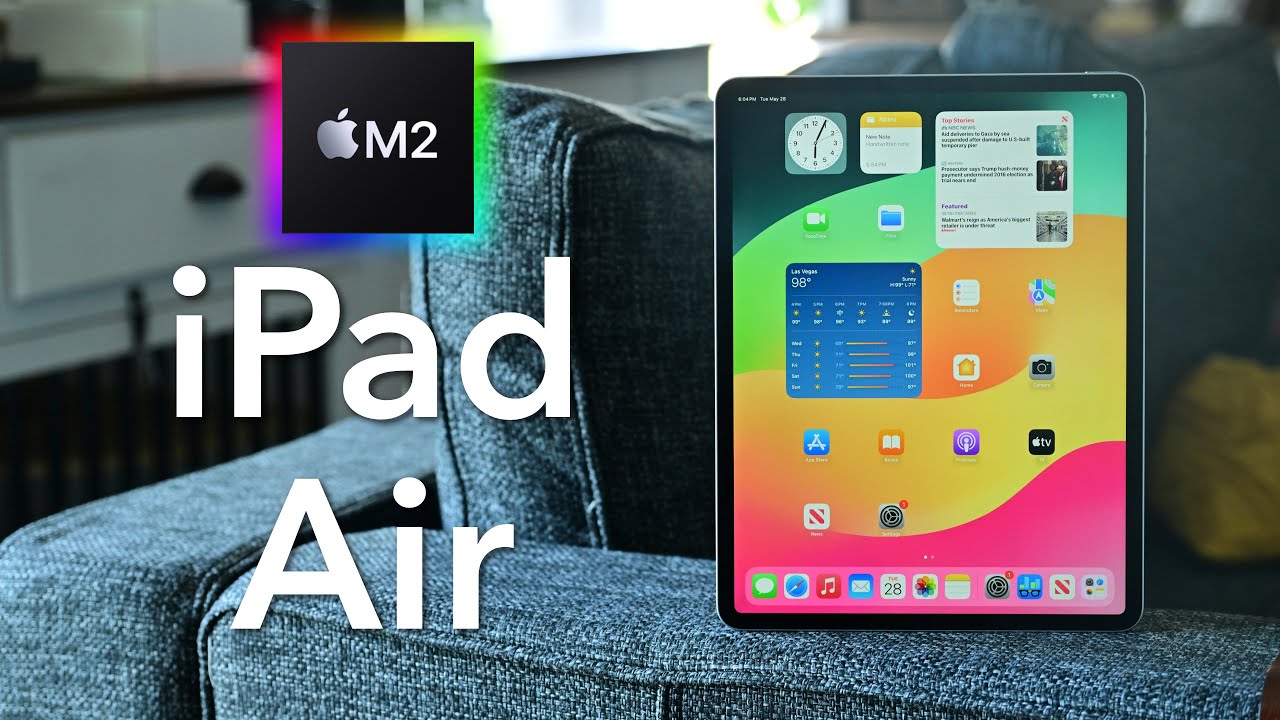
📺 Video review by AppleInsider
See today’s price and availability
Quick Verdict
Pros
- Excellent value with M2 performance at $599
- Gorgeous 11-inch Liquid Retina display
- Apple Pencil Pro support with advanced features
- Lightweight and portable at 461g
- Great battery life (10+ hours)
- Front camera in landscape orientation for better video calls
- Multiple color options (Blue, Purple, Starlight, Space Gray)
- Touch ID works reliably and quickly
Cons
- No ProMotion 120Hz display like iPad Pro
- Apple Pencil Pro sold separately ($129)
- Only dual speakers instead of quad
- USB-C limited to 10Gbps vs Thunderbolt 4 on Pro
- 128GB base storage may feel cramped quickly
Design and Display: Refined and Colorful
The iPad Air M2 maintains the modern flat-edge design introduced in previous generations, with a slim 6.1mm profile and lightweight 461-gram build that makes it incredibly portable. Unlike the iPad Pro's premium titanium, the Air uses an aluminum chassis that still feels premium while keeping costs down.
Apple has introduced fresh color options for this generation, including Blue, Purple, Starlight, and Space Gray, giving you more personality than the traditional silver and space gray of the Pro models. The colors are subtle and tasteful, adding a touch of individuality without being overwhelming.
The 11-inch Liquid Retina display delivers excellent image quality with 2360 x 1640 resolution and P3 wide color support. While it lacks the XDR mini-LED technology of the 12.9" iPad Pro, the display is still gorgeous for everyday use, content consumption, and creative work. Colors are vibrant, text is sharp, and the anti-reflective coating reduces glare effectively.
Touch ID is integrated into the top power button, providing fast and secure authentication. While Face ID is more convenient in some scenarios, Touch ID works reliably and doesn't require you to look at the device, which some users prefer.
M2 Performance: More Power Than You Need
The iPad Air is powered by Apple's M2 chip, the same processor found in the MacBook Air and 13-inch MacBook Pro. This is serious computing power that far exceeds what most people need from a tablet. The 8-core CPU and 10-core GPU configuration handles everything from casual web browsing to professional video editing with ease.
With 8GB of unified memory, multitasking is smooth and responsive. You can run multiple apps simultaneously using Stage Manager, edit 4K video in LumaFusion, work with large Photoshop files, or play demanding games without any performance issues. The M2 chip provides headroom for years of future software updates.
Real-world performance feels nearly identical to the iPad Pro for most tasks. Unless you're pushing extreme workloads like 8K video editing or running dozens of layers in Procreate, you won't notice meaningful differences. For the vast majority of users, the M2 in the Air is more than sufficient.
Battery life is excellent, consistently delivering 10-12 hours of mixed use. Video playback can stretch even longer. The USB-C port supports fast charging and data transfer, though it uses USB 3.1 Gen 2 (10Gbps) rather than the Pro's Thunderbolt 4 (40Gbps). For most users, this speed difference is negligible.
Apple Pencil Pro: Enhanced Creative Capabilities
The iPad Air M2 supports the new Apple Pencil Pro, which introduces several meaningful improvements over the 2nd generation Pencil. The squeeze gesture allows you to quickly access tool palettes, barrel roll detection enables precise brush orientation control, and haptic feedback provides tactile confirmation of actions.
For artists and note-takers, these additions genuinely enhance the creative experience. The squeeze gesture becomes second nature quickly, eliminating the need to reach for on-screen menus constantly. Barrel roll is particularly useful for calligraphy and brush work where angle matters.
The Apple Pencil Pro attaches magnetically to the side of the iPad Air for charging and pairing, just like previous generations. Latency is imperceptibly low thanks to the display's responsiveness, making writing and drawing feel natural and immediate. If you're serious about digital art or handwritten notes, the Pencil Pro is worth the investment.
Note that the Apple Pencil Pro is sold separately for $129, and older Apple Pencil models are not compatible with this iPad Air generation. This is an additional cost to factor into your purchase decision.
Camera and Audio Quality
The rear 12MP wide camera is perfectly adequate for document scanning, AR applications, and occasional photography. You probably won't use your iPad as a primary camera, but when you need it, the quality is respectable with good detail and accurate colors. The camera also supports 4K video recording at up to 60fps.
The front-facing 12MP ultra-wide camera is positioned on the landscape edge of the device, finally addressing one of the iPad's longstanding design quirks. This placement makes video calls feel more natural when the iPad is in its most commonly used orientation with a keyboard attached.
Center Stage automatically keeps you in frame during video calls by panning and zooming intelligently. This feature works remarkably well for both solo calls and group conversations, making the iPad Air excellent for remote work and virtual meetings.
The dual-speaker system delivers clear, balanced audio with decent volume. While it can't match the four-speaker setup of the iPad Pro, the audio quality is good for watching videos, video calls, and casual music listening. The speakers are loud enough to fill a small room.
iPadOS: Powerful Yet Limited
The iPad Air runs iPadOS 17 with all the latest features including Stage Manager for improved multitasking, Freeform for collaboration, and extensive app support from the App Store. The M2 chip ensures smooth performance across all system features and third-party apps.
Stage Manager allows you to work with multiple overlapping windows and connect to external displays, bringing the iPad closer to a traditional desktop experience. File management has improved significantly with the Files app, though it still feels more limited than macOS or Windows.
See today’s price and availability
For creative work in apps like Procreate, Affinity Photo, LumaFusion, and Adobe Creative Cloud mobile apps, the iPad Air excels. For traditional productivity requiring desktop software or complex file operations, you'll encounter the same iPadOS limitations as the iPad Pro. The hardware is capable, but software constrains certain workflows.
Specifications
| Specification | Details |
|---|---|
| Display | 11" Liquid Retina IPS LCD, 2360x1640, 500 nits brightness |
| Processor | Apple M2 chip, 8-core CPU, 10-core GPU |
| RAM | 8GB unified memory |
| Storage | 128GB / 256GB / 512GB / 1TB |
| Rear Camera | 12MP wide, f/1.8, 4K video up to 60fps |
| Front Camera | 12MP ultra-wide, f/2.4, landscape orientation, Center Stage |
| Battery | 28.6Wh, up to 10 hours web/video |
| Connectivity | Wi-Fi 6E, Bluetooth 5.3, optional 5G cellular |
| Ports | USB-C (USB 3.1 Gen 2, 10Gbps) |
| Audio | Stereo speakers in landscape mode |
| Authentication | Touch ID (top button) |
| Dimensions | 247.6 x 178.5 x 6.1mm |
| Weight | 461g (Wi-Fi), 462g (Cellular) |
| Colors | Blue, Purple, Starlight, Space Gray |
Frequently Asked Questions
What's the difference between iPad Air and iPad Pro?
The main differences are the display (Pro has XDR mini-LED with 120Hz ProMotion, Air has standard LCD), speakers (Pro has quad speakers, Air has dual), and port (Pro has Thunderbolt 4, Air has USB 3.1). The Pro also comes in a 12.9" size. For most users, these differences don't justify the $500+ price gap.
Does the iPad Air support the Magic Keyboard?
Yes, the iPad Air is compatible with the Magic Keyboard for iPad Air/iPad Pro 11". The keyboard provides a laptop-like typing experience with trackpad support and is available separately for $299.
Can I use my old Apple Pencil with the new iPad Air?
No, the iPad Air M2 only supports the new Apple Pencil Pro. The 2nd generation Apple Pencil and 1st generation Apple Pencil are not compatible with this model.
Is 128GB enough storage?
It depends on your usage. For casual users who stream content and don't store large files locally, 128GB can work. For creative professionals working with photos and videos, or users who download lots of content offline, 256GB or higher is recommended.
Does it have a headphone jack?
No, the iPad Air M2 does not have a 3.5mm headphone jack. You'll need to use wireless Bluetooth headphones, USB-C wired headphones, or a USB-C to 3.5mm adapter.
How long will Apple support this iPad with updates?
Based on Apple's track record, you can expect at least 5-6 years of iPadOS updates. The M2 chip ensures this iPad will remain capable and supported well into the 2030s.
Who Should NOT Buy This Tablet
Budget Shoppers: At $599, this isn't a budget tablet. If you just need basic functionality for web browsing and streaming, the standard iPad at $329 offers much better value.
Those Who Need ProMotion: If you're sensitive to refresh rates or do professional illustration work where every millisecond matters, you'll miss the 120Hz ProMotion display. The iPad Pro's smoother scrolling and lower Apple Pencil latency might be worth the premium.
Large Screen Preference: The iPad Air only comes in 11 inches. If you want the expansive 12.9" display for detailed work or media consumption, you'll need the iPad Pro.
Those Deep in Apple Ecosystem: If you already have a MacBook and iPhone, adding an iPad might be redundant. Consider if you truly need a third Apple device or if your MacBook already handles tablet-like tasks adequately.
Comparison: iPad Air M2 vs iPad Pro 12.9" M2
| Feature | iPad Air M2 | iPad Pro 12.9" M2 |
|---|---|---|
| Display | 11" Liquid Retina, 60Hz | 12.9" Liquid Retina XDR, 120Hz |
| Display Technology | IPS LCD, 500 nits | Mini-LED, 1000 nits (1600 HDR) |
| Processor | M2 | M2 |
| RAM | 8GB | 8GB or 16GB |
| Speakers | 2 speakers | 4 speakers |
| Port Speed | USB 3.1 (10Gbps) | Thunderbolt 4 (40Gbps) |
| Apple Pencil | Apple Pencil Pro | Apple Pencil Pro or 2nd gen |
| Face/Touch ID | Touch ID | Face ID |
| Weight | 461g | 682g |
| Starting Price | $599 | $1,099 |
The iPad Air offers 85% of the iPad Pro experience at 55% of the price. Unless you specifically need the XDR display, ProMotion, or larger screen size, the Air is the smarter choice. Read our full iPad Pro review for detailed comparison.
Alternative Options to Consider
- iPad Pro 12.9" M2 ($1,099) - If you need the absolute best display, ProMotion 120Hz, larger screen, or Thunderbolt connectivity, the Pro justifies its premium for professional workflows.
- iPad (10th Gen) ($349) - For casual users who don't need M2 performance, the base iPad offers excellent value with a modern design and Apple Pencil support.
- iPad Mini (6th Gen) ($499) - If portability is your priority, the iPad Mini offers a compact 8.3" form factor with A15 Bionic performance, perfect for reading and mobile use.
- Samsung Galaxy Tab S9 ($799) - Android alternative with OLED display, included S Pen, and DeX desktop mode for productivity.
The Verdict
The iPad Air M2 is the sweet spot in Apple's tablet lineup. It delivers flagship M2 performance, a beautiful display, Apple Pencil Pro support, and excellent build quality at a price point that feels fair rather than excessive. For most people, this is the iPad to buy.
The M2 chip provides more power than most users will ever need, ensuring this tablet remains fast and capable for years to come. The addition of Apple Pencil Pro support brings professional creative tools within reach of more users. The new landscape-oriented front camera finally addresses a longstanding design quirk.
What makes the iPad Air special is what it doesn't sacrifice compared to the Pro. You get the same processor, the same software experience, and support for the same accessories. What you give up (ProMotion display, XDR brightness, quad speakers, Thunderbolt) are nice-to-haves rather than essentials for most workflows.
Unless you specifically need the features the iPad Pro offers, the Air delivers better value. It's powerful enough for professional creative work, portable enough for daily carry, and affordable enough that the $599 starting price feels reasonable. Add the Magic Keyboard and Apple Pencil Pro, and you have a complete productivity and creativity system for under $1,030, still less than the iPad Pro alone.
For students, creative professionals on a budget, casual users who want premium performance, or anyone seeking the best balance of capability and value, the iPad Air M2 is the clear choice. It's not just a good iPad, it's the iPad most people should buy.
Availability
View on AmazonSee today’s price and availability
As an Amazon Associate, we earn from qualifying purchases.